Architecture, Engineering & Construction Expertise

CAD & BIM Support to Accelerate AEC Project Delivery

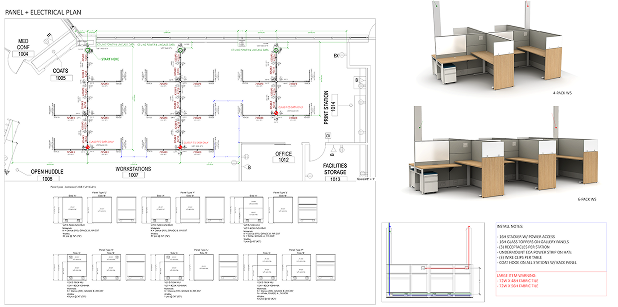
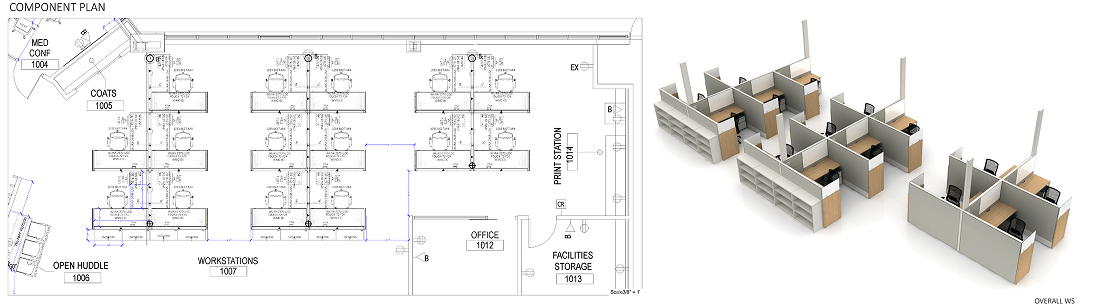
Architecture, Engineering & Construction expertise that supports technical delivery, improves coordination, and accelerates project execution across design, modeling, documentation, and construction support. Bold’s CAD, BIM, and technical teams bring proven experience in architectural drafting, engineering coordination, and construction documentation, enhanced by AI-Amplified™ workflows to deliver precision, consistency, and dependable execution. This expertise is validated through real work during the 30-Day Prove-It Deployment™ before scaling.

What We Offer

AI-Amplified™ AEC Expertise

Bold provides Architecture, Engineering & Construction expertise across architectural drafting, CAD and BIM modeling, multidisciplinary coordination, and construction documentation. Our AI-Amplified™ approach supports accuracy, coordination, and delivery quality across complex project requirements.

This delivery enables AEC expertise to be experienced and validated risk-free through the 30-Day Prove-It Deployment™.
01

Conceptualization
and Planning

Activities:

  • Identify project requirements
  • Determine site location and feasibility
  • Site feasibility and zoning analysis
  • Set budget and timeline
  • Early-phase design

CAD/BIM Role:

  • Preliminary Concept Drawings: Simple 2D/3D sketches to visualize initial ideas
  • Site Analysis Plans: Model site conditions, zoning restrictions, and potential layouts
  • Site Modeling with zoning overlays
  • Early-stage massing and spatial planning

Tools / Technologies Used:

  • SketchUp
  • AutoCAD
  • Revit (basic)
  • GIS Tools
  • Public and Proprietary AI Tools

Involved Roles:

  • Urban Planner (Assess zoning, land use, and site feasibility)
    Tools: GIS tools, AutoCAD for base maps
  • Architect / Concept Designer (Develop initial concepts and massing models)
    Tools: SketchUp, AutoCAD, Rhino
02

Design Development and Multidisciplinary Coordination

Activities:

  • Create architectural, structural, and MEP (Mechanical, Electrical, Plumbing) designs
  • Interdisciplinary coordination for model integration
  • Coordinate with stakeholders for design approval
  • Regulatory and code compliance

CAD/BIM Role:

  • 2D Drafting: Floor plans, elevations, and sections
  • 3D Modeling: Visualizing the building in three dimensions
  • Full 3D BIM Modeling for architecture, structure, and MEP
  • Clash Detection and Design Validation
  • Drawing production

Tools / Technologies Used:

  • AutoCAD
  • Revit
  • ArchiCAD
  • Tekla
  • Navisworks
  • BIM tools
  • Public and Proprietary AI Tools

Involved Roles:

  • Architect (Produce detailed designs, elevations, and sections)
    Tools: AutoCAD, Revit, ArchiCAD
  • Structural Engineer (Design framework and load-bearing elements)
    Tools: AutoCAD, Revit (Structure), Tekla
  • MEP Engineer (Plan electrical, mechanical, and plumbing systems)
    Tools: Revit (MEP), AutoCAD MEP, Navisworks
  • Interior Designer (Design interiors and finishes)
    Tools: AutoCAD, SketchUp, Revit, 3ds Max
  • Landscape Architect (Design outdoor spaces)
    Tools: AutoCAD, Civil 3D, Rhino
  • BIM Coordinator (Manage Building Information Modeling workflows and data consistency)
    Tools: Revit, Navisworks
  • Design QA Lead (Ensure design quality through reviews and compliance checks)
    Tools: Navisworks, Bluebeam
03

Pre-Construction (Tendering and Approvals) & BIM Execution Planning

Activities:

  • Submit plans for regulatory approval
  • Prepare and issue tenders for construction work
  • Develop BIM Execution Plan (BEP)
  • Model validation and Level of Development (LOD) checks

CAD/BIM Role:

  • Construction Drawings: Detailed technical documents used for tendering and permits
  • Documentation: Site plans, construction details, and specifications generated via CAD
  • BEP setup and alignment across teams
  • LOD milestone tracking

Tools / Technologies Used:

  • AutoCAD
  • Revit (for detailed drawings)
  • Bluebeam
  • BIM 360
  • Navisworks
  • Public and Proprietary AI Tools

Involved Roles:

  • CAD Technician/Drafter (Prepare detailed construction documents)
    Tools: CAD AutoCAD, Revit
  • Permit Coordinator (Ensure drawings meet regulatory standards)
    Tools: Works with CAD files for submissions
  • Quantity Surveyor (with CAD skills) Use drawings to estimate costs
    Tools: Bluebeam, CAD-based estimating tools
  • IM Manager (Oversee BIM standards, processes, and project-wide digital coordination)
    Tools: Revit, BIM 360
04

BIM-Based Procurement
& 5D Estimating

Activities:

  • Source materials, equipment, and labor
  • Finalize contracts with vendors and subcontractors
  • Quantity takeoffs
  • Link cost data with BIM
  • Vendor coordination and shop drawing production

CAD/BIM Role:

  • Quantity Takeoffs: CAD tools can calculate material quantities
  • Shop Drawings: Specialized drawings used by suppliers to fabricate components
  • 5D BIM Integration for cost modeling
  • Digital takeoff alignment with bids

Tools / Technologies Used:

  • CAD + Estimating Tools (e.g., Bluebeam)
  • Revit
  • Navisworks
  • BIM 360
  • CostX
  • SolidWorks
  • Tekla
  • Public and Proprietary AI Tools

Involved Roles:

  • BIM Coordinator (Manage data-rich models for bidding)
    Tools: Revit, Navisworks, BIM 360
  • Fabrication Detailer (Create shop drawings for custom components)
    Tools: AutoCAD, SolidWorks, Tekla
  • Cost Engineer (Estimate, monitor, and control project costs)
    Tools: CostX, Bluebeam
05

Construction / Execution
& 4D Scheduling

Activities:

  • Groundwork, structure, MEP installation, interior works
  • Site supervision and quality control
  • Site coordination
  • Model-based construction sequencing
  • Clash-free field coordination

CAD/BIM Role:

  • As-Built Drawings: Real-time updates to design based on site changes
  • Coordination Models: Avoid clashes between systems (especially in BIM)
  • 4D BIM for time-phased planning
  • Site logistics modeling
  • Field-to-BIM updates

Tools / Technologies Used:

  • AutoCAD
  • Navisworks
  • BIM 360
  • Revit (for coordination)
  • Total Station CAD plugins
  • BIM 360
  • Public and Proprietary AI Tools

Involved Roles:

  • Site Engineer/Construction Manager (Oversee execution, refer to CAD plans on site)
    Tools: AutoCAD, Revit (for clash detection)
  • BIM Manager (Coordinate 3D models and manage updates)
    Tools: Revit, Navisworks, BIM 360
  • Field CAD Technician (Update plans based on site conditions)
    Tools: AutoCAD, Total Station CAD plugins
  • VDC Coordinator (Facilitate Virtual Design and Construction collaboration and models)
    Tools: Synchro, Navisworks
06

Post-Construction Handover
& 7D Facilities Management

Activities:

  • Final inspections and certification
  • Handover to the client
  • Operations and maintenance planning
  • As-built documentation
  • BIM handover for facility operations

CAD/BIM Role:

  • Final As-Built Drawings: Reflect all completed work for client records
  • Facility Management Models: BIM models handed off for long-term building management
  • Final LOD-500 As-Built Models
  • COBie Data Handover
  • Asset tagging for maintenance and lifecycle tracking

Tools / Technologies Used:

  • Revit (for coordination)
  • BIM 360 (facility management)
  • Revit (for coordination)
  • CAD file management systems
  • FM systems
  • Archibus
  • Planon
  • Public and Proprietary AI Tools

Involved Roles:

  • As-Built Drafter (Produce final "as-built" drawings)
    Tools: AutoCAD, Revit
  • Facilities Manager (with BIM skills) (Use CAD/BIM data for maintenance and operation)
    Tools: BIM 360, Revit
  • Documentation Specialist (Organize digital drawing sets for client handover)
    Tools: CAD file management systems

Our Works

Stage | Key AEC & BIM Roles

Stage

Key Roles

Bold’s 30-Day   Deployment™

Prove the Fit Through Real Work

Interviews and planning alone rarely reveal how well talent or solutions will perform once real work begins. True alignment becomes clear through execution inside real operating conditions.

Bold’s approach is built around this principle. The 30-Day Prove-It Deployment™ allows organizations to experience performance, collaboration, and fit through real work before making long-term decisions. This reduces risk, removes guesswork, and ensures expectations are validated through outcomes rather than assumptions.

(Terms and Conditions apply)

Comprehensive Remote Support for AEC & BIM Projects

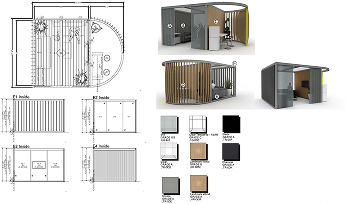
Bold Business delivers scalable engineering support teams skilled in computer-aided design (CAD), drafting, and technical documentation. We help manufacturing, construction, infrastructure, and product design companies improve time-to-market and project accuracy all while aligning with your systems, specs, and compliance standards.

Architecture, Engineering & Construction services are delivered through an AI-Amplified™ operating model, enabling both the initial proving phase and long-term operational scale while ensuring secure and reliable performance as project needs evolve.
Management Process Support

Bold Business ensures every CAD, AEC, and BIM engagement is backed by structured processes, technical oversight, and continuous improvement. Our teams follow proven project management frameworks, ensuring consistent quality, on-time delivery, and seamless integration with your operations.

U.S.-Based Technical Oversight and Project Management

Platform-Agnostic Drawing and Modeling Standards

Industry-Specific Standard Operating Procedures

QA Checklists and LOD Protocols

LMS-Based Onboarding for Revit, Navisworks, BIM 360

Integrated Task and Document Management Systems

AI-Amplified™
Industry Expertise

Bold Business enhances industry expertise with AI-driven workflows that remove friction, accelerate execution, and improve decision-making. We achieve AI-Amplification™ through the use of Bold AI-Workbench™, enabling our specialists to do tasks faster, think deeper, and deliver higher productivity without compromising quality or human judgment.

The result: faster outcomes, smarter execution, and scalable impact across industries.

Partner with Confidence: Experience the Bold Business Advantage

Frequently Asked Questions
(FAQs)

What CAD and BIM platforms do you support?

We support AutoCAD, Revit, ArchiCAD, Navisworks, BIM 360, Tekla, Civil 3D, Synchro, SolidWorks, CostX, and more. Our teams are platform-agnostic and can work in the environment you already use.

Yes. We support projects from BIM setup and modeling through 4D scheduling, 5D cost estimation, and 7D facilities handover. Our teams can manage LOD progression and BIM execution planning throughou

We support architecture studios, general contractors, civil and structural engineering firms, real estate developers, infrastructure consultants, and specialty trade partners.

Initial teams can be onboarded within 1–2 weeks. We offer rapid team scaling based on your current project pipeline and technical requirements.

Absolutely. We follow your CAD layering, naming conventions, file hierarchies, and BEP protocols. Custom SOPs and checklists are built for every engagement.

Yes. Our BIM Managers can build BEPs aligned with your delivery model, LOD requirements, coordination workflows, and data exchange schedules.

We use tools like Navisworks and BIM 360 to identify clashes, log issues, and resolve model coordination across architectural, structural, and MEP disciplines.

We use AI to assist with drawing validation, clash previews, revision tracking, and COBie asset tagging helping our teams produce faster and with fewer manual errors.

Yes. We support 4D sequencing through Synchro and Navisworks and link cost data into 5D BIM environments using tools like CostX and Revit plug-ins.

Yes. We develop accurate LOD 500 as-builts and export COBie data for client use in FM platforms like Planon, Archibus, and Maximo.

We follow a QA/QC framework that includes peer reviews, checklists, revision logs, and platform-integrated feedback loops. Every drawing and model is reviewed before client delivery.

Yes. Our teams are trained in regional standards including IBC, Eurocodes, and country-specific CAD/BIM regulations. We assign roles based on geographic project requirements.

Yes. We process point cloud data into Revit-compatible models using Autodesk tools and ensure alignment with architectural and structural detailing standards.

Absolutely. Our teams operate across multiple time zones and are structured for 24/7 collaboration, with local and offshore alignment as needed.

Bold provides managed CAD and BIM teams, not just individuals. We deliver fully trained, QA-backed, role-based resources with built-in oversight, documentation, and KPIs.

Ready to Optimize Your CAD & Engineering Operations?

Let Bold Business show you how AI-first outsourcing can help you cut cycle times, reduce overhead, and increase technical output. Book a discovery call today to customize your engineering support team.

AEC expertise should be demonstrated through dependable execution inside real project workflows before support scales further.